
Couple Hug AI Image Prompts
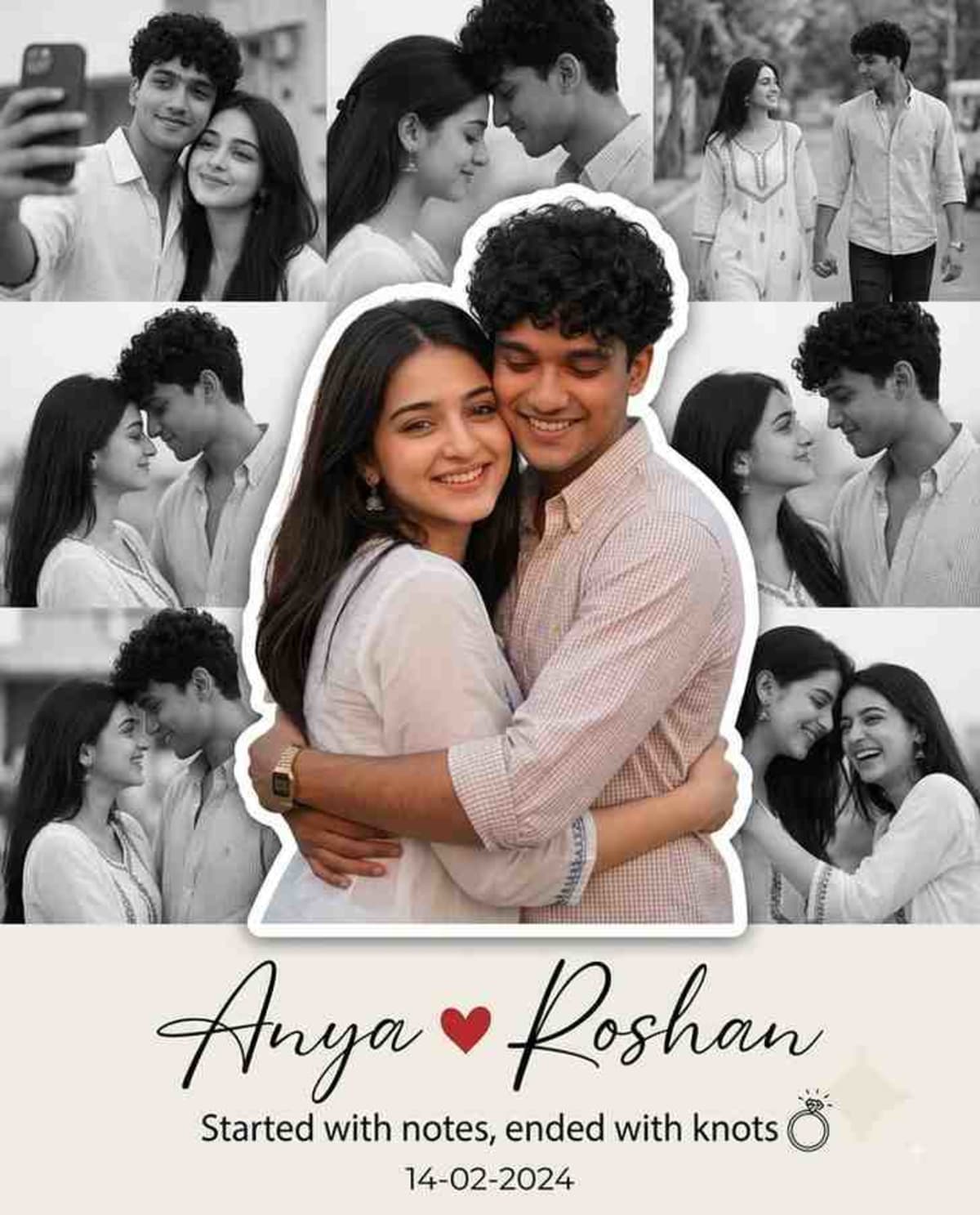
Generate an ultra-realistic, premium engagement and love story collage poster featuring a central colored couple cutout framed by black-and-white candid memories.
Prompt Text
Ready to copy & executeUse this prompt to generate a collage in the same style as the reference:
Ultra-Premium Couple Memory Collage Prompt
Create an ultra-realistic, premium engagement/love story collage poster in a clean luxury style.
Layout:
Vertical 4:5 poster.
Centerpiece: One large full-color cutout of the couple embracing each other, with a smooth white sticker-style outline around them.
Background: 8–10 black-and-white candid couple photos arranged in a balanced collage around the centerpiece.
Soft curved white design at the bottom with elegant minimal styling.
Clean, premium wedding invitation aesthetic.
Center Couple:
Standing close together.
Warm genuine smiles.
Romantic hug.
Natural body language.
Editorial photography quality.
Ultra-detailed skin texture.
Soft natural lighting.
Shallow depth of field.
DSLR look.
85mm lens.
f/1.8.
Extremely realistic.
Background Photos: Include different romantic candid moments such as:
Selfie together.
Forehead touch.
Hugging.
Laughing together.
Walking outdoors.
Looking into each other's eyes.
Celebration moment.
Cozy close-up portrait.
Casual travel photo.
All background photos should be:
Black & White.
Soft contrast.
Slight blur to keep focus on the center image.
Different poses and expressions.
Natural emotions.
Bottom Design: Large elegant handwritten names:
Name 1 ❤️ Name 2
Below: "Started with notes, ended with knots" 💍
Date: DD-MM-YYYY
Minimal ring icon beside the quote.
Color Palette:
White
Light Beige
Soft Gray
Black & White background photos
Small red heart accent
Style: Luxury engagement poster, wedding memory collage, premium scrapbook design, clean modern typography, Instagram-worthy, Pinterest aesthetic, elegant composition, cinematic lighting, ultra-HD, 8K, highly detailed, professional photo manipulation, realistic shadows, premium print quality.
If using reference photos:
Use the uploaded reference image(s) only for facial identity reconstruction.
Preserve the faces exactly as provided (facial structure, skin tone, eyes, nose, lips, hairstyle, expression, and natural proportions).
Do not alter the identities.
Create original poses while keeping the collage layout identical in style to the reference.Introduction
This prompt is designed to create a luxury wedding memory collage or engagement poster combining a vivid, detailed centerpiece with a carefully curated set of monochrome background photos. It provides exact layout instructions, photographic settings, and typographic elements to achieve a professional, Instagram-worthy finish. Users can also incorporate reference photos to maintain specific facial identities.
Prompt Details
Concept & Creative Objective
Produce a vertical 4:5 luxury collage poster that highlights a warm, editorial-style embrace in full color, surrounded by softer black-and-white candid relationship memories and elegant minimal typography.
Why This Prompt Works
The prompt establishes a clear visual hierarchy by contrasting a high-detail, full-color centerpiece shot with blurred, low-contrast black-and-white background images. It specifies precise photographic parameters like an 85mm lens at f/1.8 and soft natural lighting to drive realism, while clearly defining layout boundaries, color palettes, and textual placements.
Prompt Breakdown
The instructions mandate a vertical 4:5 aspect ratio layout with a sticker-style white outline around the central couple. Surrounding the centerpiece are 8 to 10 black-and-white candid photos depicting various romantic scenarios like selfies, forehead touches, and travel moments. The bottom section includes customizable placeholders for names, a specific quote, a date, and a minimal ring icon, all supported by a clean color palette of white, beige, soft gray, and a small red heart accent.
Instructions
Customization Tips
Update the placeholder names, date, and quote at the bottom of the prompt to fit your specific relationship milestones. If utilizing reference photos, ensure you upload clear portraits so the tool can accurately reconstruct the facial identities while applying the requested poses and layout.
Generation Best Practices
Input this prompt into Gemini with image generation capabilities enabled. If the tool accepts image uploads, provide reference photos of the couple to ensure accurate facial identity preservation as outlined in the prompt instructions.
Help & Answers
Frequently Asked Questions
This prompt is designed to be used with Gemini, particularly when generating images and utilizing reference photos for facial identity reconstruction.