
Stylish AI Boy Prompt – Modern Fashion Portrait Generator
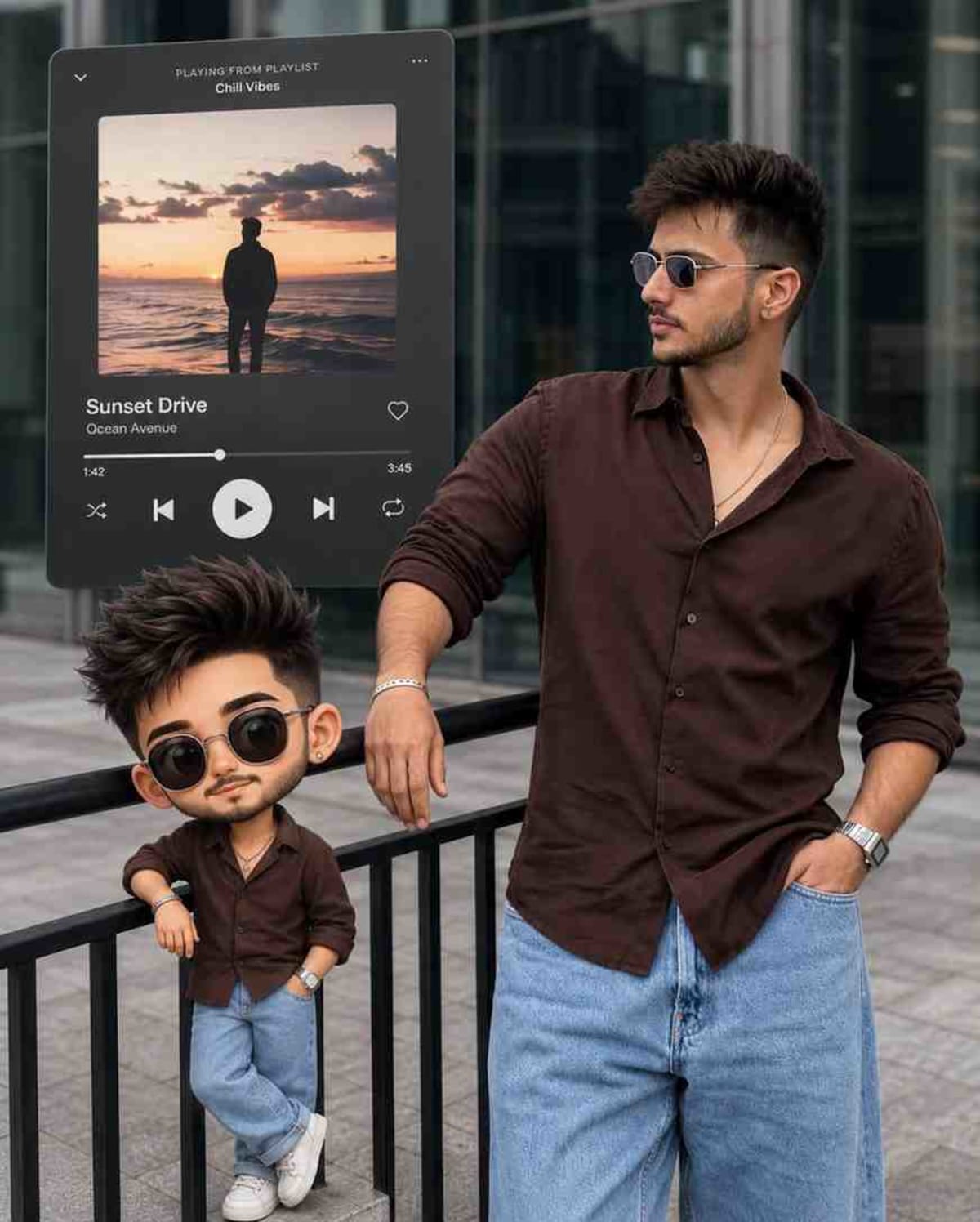
Generate an ultra-realistic 4:5 modern fashion portrait incorporating an uploaded photo, an urban background, a floating music player UI overlay, and a matching chibi cartoon companion.
Prompt Text
Ready to copy & executeCreate a 4:5 ultra-realistic portrait based on the uploaded photo, preserving the subject's facial features, hairstyle, skin tone, body proportions, accessories, and overall identity with maximum accuracy. Keep the original outdoor modern urban setting with a glass building facade, tiled pavement, and natural daylight. Add a large floating music player overlay behind the subject, styled like a minimalist dark-gray streaming app interface with album artwork, song title, playback controls, progress bar, and subtle shadow. Include a matching chibi cartoon version of the subject beside them, wearing a coordinated outfit and accessories, with oversized head, expressive eyes, and the same hairstyle and eyewear. Allow different poses and natural expressions for each generation while maintaining the same composition style, camera angle, lighting quality, depth, and visual balance. Adapt the outfit to match the uploaded photo and the subject's gender while keeping the overall aesthetic cohesive and stylish. High detail ail, realistic textures, soft shadows, sharp focus, premium social media edit, 4:5 aspect ratio.Introduction
This prompt is designed for generating high-detail social media portraits that blend real-world photography aesthetics with stylized graphical elements. By referencing an uploaded photo, it preserves key facial features and identity while introducing creative digital overlay components like a streaming app interface and a complementary chibi cartoon character. It provides structured guidance for maintaining consistent lighting, depth, and compositional balance across generations.
Prompt Details
Concept & Creative Objective
The objective is to produce a premium social media edit featuring a realistic portrait of a subject in a modern urban environment, paired with a minimalist music player interface and a matching chibi cartoon character.
Why This Prompt Works
The prompt works by combining specific structural anchors such as the 4:5 aspect ratio, an explicit outdoor urban setting with a glass facade and tiled pavement, and clear layered elements like the background music player UI and the side-by-side chibi companion. These defined layers prevent visual clutter and maintain a cohesive editorial aesthetic.
Prompt Breakdown
The prompt instructs the AI to preserve facial features, hairstyle, skin tone, and body proportions from an uploaded photo with maximum accuracy. It sets parameters for the urban background, mandates a minimalist dark-gray streaming app interface with playback controls, requires a matching chibi version of the subject with coordinated clothing, and enforces a 4:5 aspect ratio with high detail and soft shadows.
Instructions
Customization Tips
You can modify the prompt by changing the style of the music player interface to fit a different color scheme, or swap out the chibi cartoon element for a different graphic overlay if a minimalist look is preferred. Adjust the clothing descriptors to test different fashion styles while keeping the subject's identity tied to the uploaded photo.
Generation Best Practices
Ensure you upload a clear, high-resolution source photo of the subject to help the AI accurately preserve facial features, skin tone, and accessories. Run multiple generations to explore the varied natural expressions and poses permitted by the prompt instructions while keeping the composition stable.
Help & Answers
Frequently Asked Questions
This prompt requires an uploaded photo of the subject so the AI can preserve facial features, hairstyle, skin tone, body proportions, and accessories with high accuracy.